


Subscribe and receive email notifications of new blog posts.
 RSS Feed
- 2026 | 27 Posts
- 2025 | 52 Posts
- 2024 | 50 Posts
- 2023 | 55 Posts
- 2022 | 83 Posts
- 2021 | 70 Posts
- 2020 | 43 Posts
8
Trending: Antivirus Software

Steps to Keeping Your PC Safe from Viruses and Malware
From Your Friends at Integrity Computer Consulting and Repair
With our current and daily compounding reliance on technology and computers to work, pay bills, shop, attend school, etc., protecting your computer from viruses and malware is paramount, especially if you are using a PC that has Windows. There are so many advertisements out there for so many different varieties of anti-virus software, so which do you choose? What is the best way to keep your computer clean and your data, and, essentially, your identity, safe?
Your first line of defense is keeping your computer up to date.
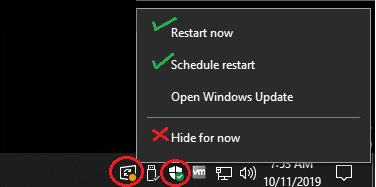
Do not ignore the notifications that pop up on the taskbar! Windows Update and Security Center notifications are located down by the clock. If you see the Windows Update notification displayed, left-click on it, and select your restart option to make sure updates are applied. We do not recommend hiding the notification. Click on Open Windows Update if you want to view the updates that are being installed.
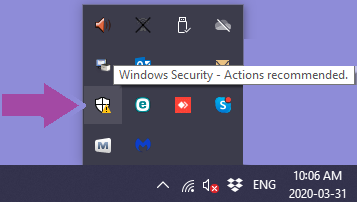
If there is a yellow exclamation on the Windows Security shield icon, right-click on it to open the Windows Security Center.
Items or settings that need to be addressed will be listed on the next screen.
The second line of defense is having virus protection.
We recommend the free onboard virus protection that comes with Windows 10, Windows Defender. It works very well with the firewall settings in Windows as it is a Microsoft product. We often find that paid versions of antivirus software (McAfee, AVG, Norton, etc.) are not only system resource hogs that can and do bog down the performance of your PC, but they often cause issues with other programs and settings. They also can be costly, and many try to rope you into automatic renewals that automatically charge your card, monthly, or yearly. The free stuff in this case, works just as well, if not better, than the paid options.
The third line of defense is having malware removal software.
Even with everyday, regular browsing on the internet, you can pick-up not only viruses, but straggler programs, junk, and malware; malware removal software will remove all those things. We recommend the free version of MalwareBytes. If you want real-time protection and can't commit to manually opening the program and scanning regularly, MalwareBytes has a paid version. However, the same applies here as well; it's a bit more of a hefty program and constantly runs in the background which can – and often does – affect a computer's performance.
If you have any questions about anything above, would like help with your Mac, need help installing or uninstalling any programs, removing malware, or viruses, you can always check in with us! These things can also be done remotely. Please contact our office via phone at 208.288.4345 or email info@integrityidaho.com if you need immediate assistance.




Privacy Policy / DMCA Notice / ADA Accessibility


